
Interactive floor plans
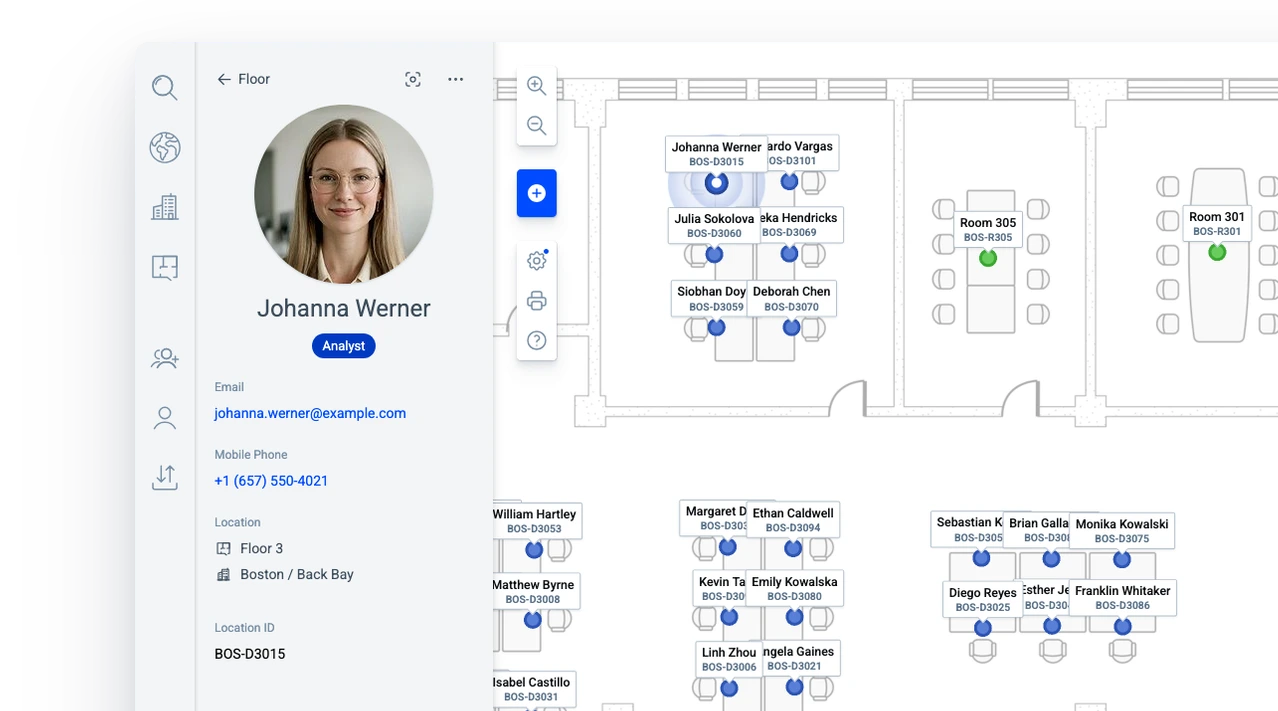
Upload your floor plans and place people, desks and rooms on them, so the plan becomes the record of seating assignments.
Staff directory
Every person has a profile with a photo, a role and contact details, tied to the desk where they sit.
Buildings & campuses
Bring all of your locations together, from a single office to a campus spread across several cities.
Desks, rooms & resources
Desks, meeting rooms and shared equipment each have their own marker, with the details people need before they walk over.
Search & navigation
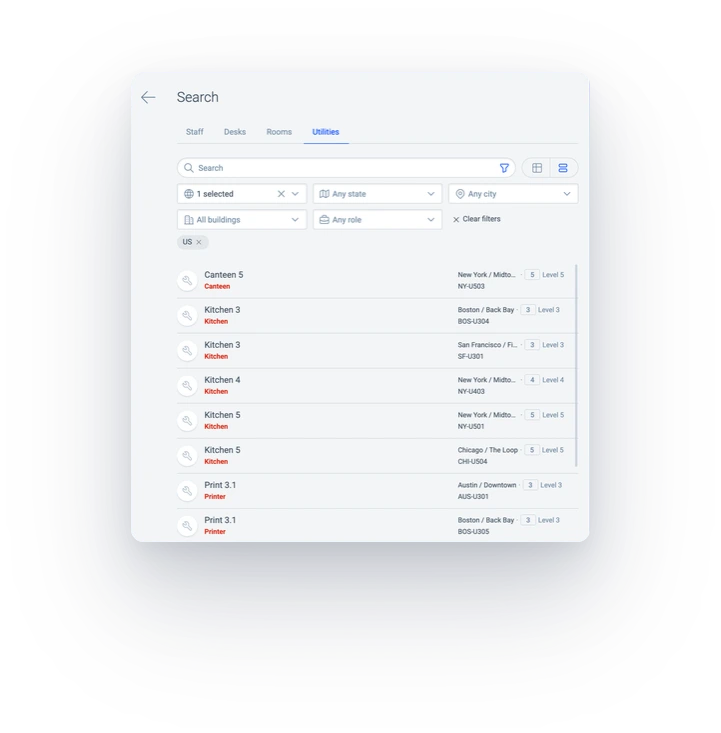
Search for a person, a room, a desk or a printer across every building, and the plan takes you there.
Analytics & reporting
See how many people, desks and rooms you have on any floor, in any building or city, and in any department.
Data sync & API
Import and export people and desks, keep the plan in step with your data sources, or connect your own systems through the API.
Security
People sign in with the company account they use every day, and role-based access control limits editing to the roles you assign.
Pricing
Every feature is included, with nothing to unlock later.
Interactive floor plans
Live seating charts for every floor, in every building
Upload a floor plan, place people, desks and rooms on it, and Deskradar keeps it as the single record of seating assignments. Zoom into a team area, move across the floor, and switch between floors without leaving the view.
Explore interactive floor plansA location for every name
Every person in Deskradar has a profile with a photo, a role and contact details, tied to the desk where they sit. Search for a name and you can see the face, get in touch, or walk over to the right desk.
Every building, on the map
Deskradar shows all of your locations on the locations map, from a single office to a campus spread across several cities. Each building holds its own floors and floor plans, so a visitor can go from the map to the right building and the right floor in a few clicks.
Desks, rooms & resources
Every desk, room and resource, with the details attached
Deskradar draws three kinds of place, each in its own way, so a floor can be read at a glance. Every marker carries the details people need before they walk over, from the hardware at a hot desk to the equipment in a meeting room.
Explore desks, rooms & resources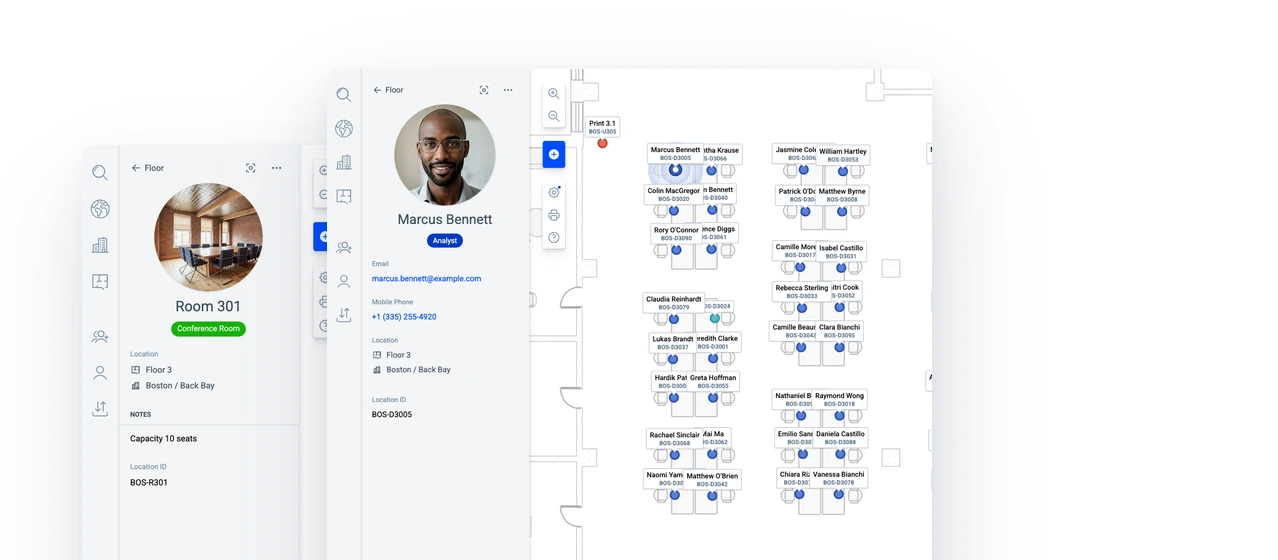
Desks
Desk counts guide office growth
Assigned, spare and hot desk counts show headcount, free desks and shared desks across floors, buildings and locations, supporting hiring and moves.
Explore desks, rooms & resourcesRooms
Room details shape meeting plans
Photos, types, equipment notes and statuses with notes give every team the same room information. Contact details identify the person responsible for each room.
Explore desks, rooms & resourcesResources
Resource locations point colleagues to equipment
The floor plan shows where printers, first aid kits and fire extinguishers are. Photos identify each resource, and contact details show who looks after it.
Explore desks, rooms & resourcesSearch & navigation
Find any person, room or resource in a single search
Type part of a name, a role or a room and Deskradar finds it, even with a spelling mistake. Results are grouped into people, rooms, desks and resources, and choosing one moves the plan to the right floor with the details open.
Explore search & navigation- Country
- City
- Building
- Name
- Desk number
- Job title
- Phone number
- Employee number
Analytics & reporting
Headcount, desk and room counts for office planning
Because every person on the plan sits at a desk, Deskradar already knows the headcount of every floor, building and department. It also shows how many desks are free, how many are shared, and how many rooms you have of each kind, so you can plan the next hire or the next lease with real numbers.
Explore analytics & reportingGlobal headcount and desks
How many people sit in each building and on each floor, and how many desks are assigned, free or shared.
Flexible filtering
Narrow the numbers to a country, a city, a building or a department, and read the same totals for that slice.
Rooms analytics
How many rooms you have in each building, and how many of each kind when the rooms carry a role.
Data sync & API
Kept in step with the systems your company runs
People and desks can come in from a spreadsheet, stay in step with the data sources your company runs, or arrive through the API, so the plan follows the organisation instead of the other way round.
Import & export
Upload the list that HR keeps, review what will change before anything changes, and export the same data back to a file whenever you need it.
Explore data sync & APISynchronization
Keep the plan in step with your directory or another data source, in the cloud or on premises, so new employees and leavers are provisioned and deprovisioned automatically.
Explore data sync & APIAPI access
Connect the systems your company runs, each with its own API key and its own role, and every change they send appears on the plan.
Explore data sync & APIFor the enterprise
Enterprise-ready from day one
From a single building to hundreds, and from dozens of employees to thousands, Deskradar holds the whole organisation. It fits the way your company already signs in, manages access and keeps its people data.
Explore securitySingle sign-on
People sign in with the company account they use every day, and their access is revoked when that account is deactivated.
Roles and permissions
Every employee has read access to the plan. Editing and administration are limited to the roles you assign.
Data synchronization
Keep the plan in step with your directory or another data source, in the cloud or on premises, and connect your own systems through the API.
Any number of sites
Buildings, floors and markers are unlimited, so a campus across several cities fits, with room to grow.
Data protection
Your data travels over encrypted connections, is backed up automatically, and is kept separate from every other workspace.
A person to talk to
Ask us anything about a rollout or a migration, and we help you solve it.
Single sign-on included
Deskradar works with Google Workspace, Microsoft Entra ID, ADFS and Okta. It is set up once, and from then on joining and leaving the company is your identity provider's job.
Explore security






- Google Workspace
- Microsoft Entra ID
- Active Directory Federation Services
- Okta
- Ping Identity
- OneLogin
- JumpCloud
The right access for every person
Every employee has read access to the plan, and editing is limited to the editors you assign. Administrators manage the workspace and its users, so the plan stays correct however many people use it.
Access from first day to last
New hires find colleagues on the plan from their first day with single sign-on or an Administrator’s invite link. On a colleague’s last day, your company controls when access ends through Administrator deactivation or its identity provider.
Outcomes
What changes when the plan is right
 Onboarding
Onboard faster
New hires find their team, their desk and the printer on the first day, from the plan.
Explore seating charts Moves & changes
Move without disruption
A desk move is a marker moved, and a reorganisation is a file. Nothing to redraw and nothing to send around.
Explore data sync & API Planning
Plan with real numbers
Headcount, free desks and rooms for any floor, building or department, straight from the plan.
Explore analyticsEasy setup
Up and running in a day
Nothing to install and no project to run. Four steps take you from an empty workspace to floor plans the whole company opens.
- UploadUpload floor plansCreate your buildings and floors, then upload a floor plan for each floor. Add as many buildings and floors as you have.Explore buildings & campuses
- ImportImport your staff listUpload the spreadsheet HR keeps, match the columns, and review every change before it runs. Names, roles and contact details fill the directory.Explore data sync & API
- ImportSync with a data sourceKeep the plan in step with your directory or another data source, in the cloud or on premises, so new employees and leavers are provisioned and deprovisioned automatically.Explore data sync & API
- PlacePlace the markersDrag people, desks, rooms and resources onto the plan. Auto numbering gives every desk a unique number, so you never have to invent a scheme yourself.Explore interactive floor plans
- ShareShare the planTurn on single sign-on and share the link. Viewers have read access, editors maintain the plan, and administrators manage the workspace.Explore security